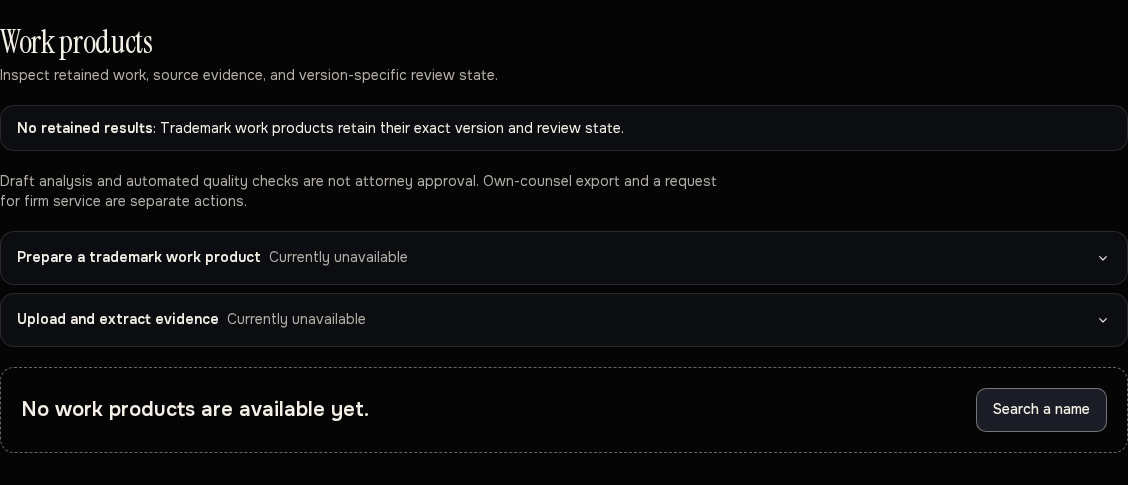
3553c0f.Read a work product
Each work product shows its title, its version, whether it is Software output or Legal work product, its state, its references and its quality checks. States you may see are Draft, In review, Approved, Returned and Replaced by a newer version.
Quality checks are automated. The screen says it plainly: draft analysis and automated checks are not attorney approval.
Export for your own counsel
Choose Export for your counsel on a work product to download it for your own attorney. Export is separate from asking CorAura for legal services.
If an export is refused, the page tells you why, for example that you need to ask an Owner or Admin, that the work product is no longer available, or that it changed after the link was made and you should export the current version.
What needs a legal matter
Prepare a trademark work product and Upload and extract evidence need an accepted, paid matter. Until then they are unavailable and say so. See Track your requests and matters.
Your source documents
Documents kept for your organization are listed at the bottom as Your source documents. If there are none, the screen says "No documents available in this view."
Who can use this screen
A Member needs Work products at View to read it and Full to create, edit and submit work for review.