Before you search
- You need active software access. A free trial gives it to you: Start your free trial.
- If you are a Member, you need Research at Full to run searches. At View you can read results but not start a search.
- A search uses part of your search allowance. Your account screen shows how many searches remain.
Run a search
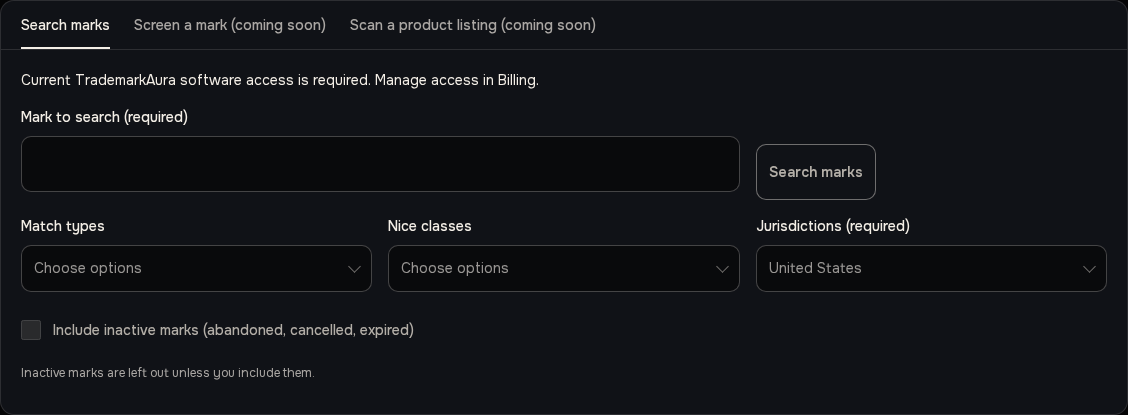
- Choose Search marks.
- Type the name in Mark to search (required).
- Optionally open Match types and choose how close a match should be: identical, fuzzy, embedded, phonetic or lookalike.
- Optionally open Nice classes to limit the search to the classes of goods or services you care about. Leave it empty to search all classes.
- Check Jurisdictions (required). United States is the choice today.
- Turn on Include inactive marks (abandoned, cancelled, expired) if you also want those. They are left out unless you include them.
- Choose Search marks.
3553c0f.When a search stops early
A large search can stop part-way, for example at your allowance limit or a time limit. The result says what was checked and what was not. If your wallet can cover the rest, the page offers to check the rest of the search and shows the credits it needs. Otherwise it says why it cannot continue and suggests narrowing the search, for example by class or jurisdiction. See Plans and seats for wallet credits.
Earlier searches
Past searches stay under Retained research history. Pick one to read its result again without using allowance.
Next: Read a result and its limits.